
Dotori Studio · Video (DotoriCut)
BetaA video editor that opens in your browser: quick cuts and Shorts on a simple screen, and tracks, keyframes and color scopes in pro mode. Your files stay on this device.
Runs on your device. Nothing is uploaded.
Two screens, one editor
-
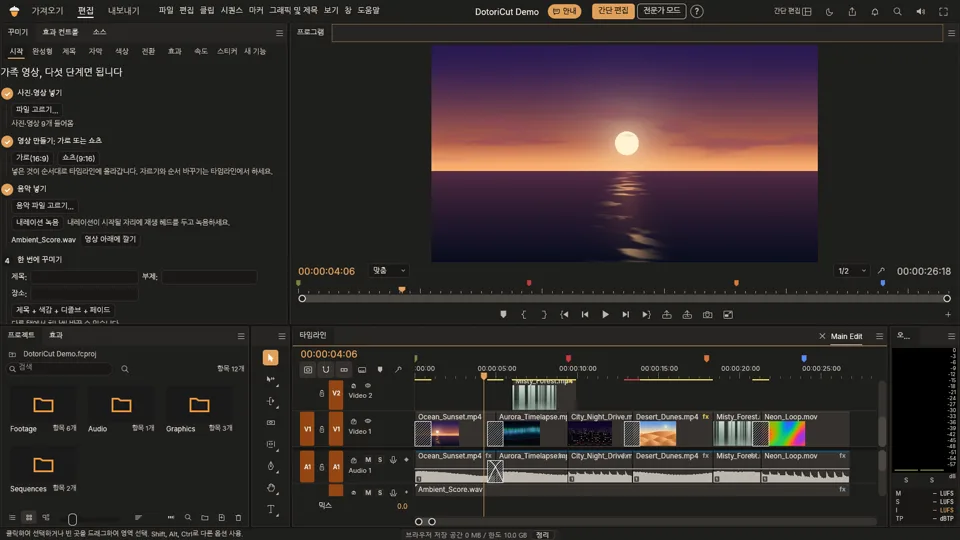
Simple editor
Put in your clips, cut them, make a Short or a wide video, add a title, captions, color and music, and export. On a phone this is a touch screen with a timeline under the picture.
-
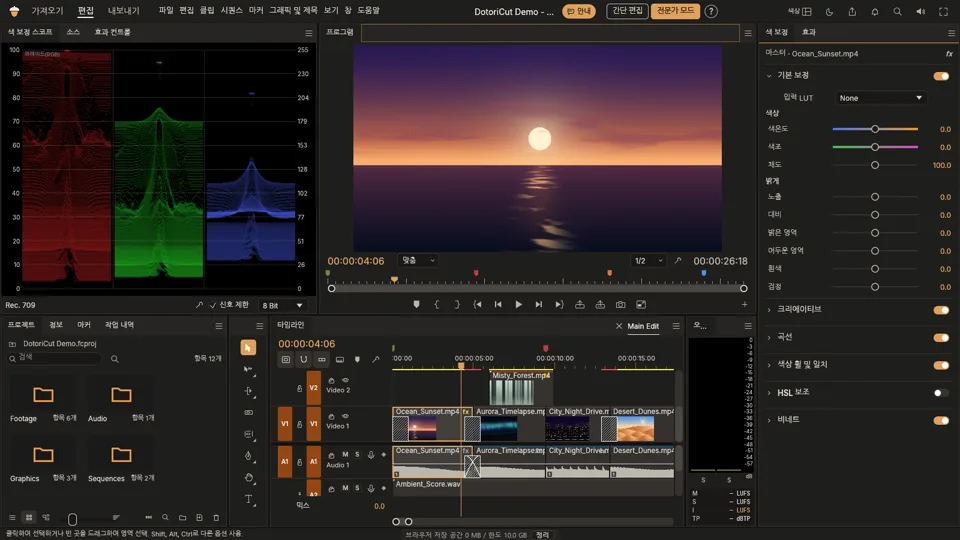
Pro mode
The full editor, with workspaces for editing, color, effects, audio and captions: several tracks, keyframes, masks, scopes and a mixer. You can switch between the two screens at any time.
Pro mode is for computers: a mouse and a window at least 1024 px wide. On phones and tablets the simple editor opens instead.
What it does
-
Cut and join
Trim, split, duplicate and reorder on a timeline, with undo. 16:9, 9:16 and 1:1.
-
Shorts auto framing
Turns a wide clip into 9:16 and follows the face, without slowing the export.
-
Color
18 looks and 8 creative film looks, and in pro mode color controls with scopes.
-
Titles and captions
Title templates, three text animations, and captions made on your device from what is said.
-
Sound and AI voice
Music that dips by itself under speech, narration recording, your own music, and an AI voice that reads your text, marked on screen as machine made.
-
Speed
Fixed speeds and six speed curves, with the sound following the curve.
-
Transitions and effects
Six transitions, fades and vignette, plus two marked as trial: stabilizing and removing the background behind a person.
-
Export
MP4 with H.264 video and AAC sound. No watermark, and the file is made on this device.
How to use the Dotori Studio · Video (DotoriCut)
- Press “Open the simple editor” (on a phone, the touch screen opens) and choose your videos, photos and music. They stay on this device.
- Choose the shape: wide 16:9, Shorts 9:16 or square 1:1. Your clips go on the timeline in order, and Shorts auto framing can follow the face in a wide clip.
- Cut the parts you do not want, then add a title, captions, a look and music. Speech makes the music dip by itself if you turn that on. Everything can be undone.
- Press Export. The MP4 is made on this device, faster on a PC with a graphics card and much slower on a phone. Keep the tab open until it finishes.
- When you need more, switch to pro mode: Editing, Color, Effects, Audio, Captions and Graphics and All Panels are workspaces of the same project.
What it does well
Most people come to make one thing: a Short from a long clip, or a family video with a title and music. The simple editor keeps those steps in order, and the phone screen does the same with a thumb. Nothing has to be installed, and there is no account.
Pro mode
Pro mode is the full editor on the same site. Work on several tracks with keyframes and masks, grade with color controls and scopes, mix sound and keep several sequences in a project. Export stays H.264 and AAC. A mask together with color correction on one clip makes its export much slower, about 9 times in our tests.
What needs a PC
A phone can do the editing, but long exports, background removal and the speech models are heavy. Those tools show the expected time and a warning, or say to use a PC when a phone's memory cannot do them.
Frequently asked questions 11
Are my videos uploaded?
No. The editor runs in your browser, on this device. The page only fetches its own program files and, when you use automatic captions or the AI voice, their models from Hugging Face. Your video is never sent anywhere.
Can I use it on a shared computer?
Yes, but clear it when you finish. So that your work is not lost, the editor keeps copies of the videos you add and your project (captions and title text included) in this browser, and opens them again next time. The next person could see them. Clear them with the Clear button in the PC editor, with "Clear and start over" under More on the phone screen, or by clearing this site's data in your browser. The copies never leave your device.
Is it really free?
Yes: no sign-up, no watermark and no limit on exports. It is in beta, so if something breaks, say so in the rating box at the end of this page.
What is the difference between the simple editor and pro mode?
They are two screens on the same engine. The simple editor keeps the common jobs in view: cut, make a Short, title, captions, look, music, export. Pro mode shows everything: several tracks, keyframes, masks, color scopes, an audio mixer and several sequences.
Which browsers does it work on?
It is made for the latest Chrome or Edge on a PC. Without a graphics card it still runs, more slowly. Firefox and Safari have not been tried.
Does it work on a phone?
The simple editor has its own touch screen with a timeline and a tool bar. Pro mode opens on computers only; phones and tablets get the simple editor. Heavy jobs say how long they will take, and what a phone's memory cannot do tells you to use a PC. So far this has been tried in emulation only, not yet on a real Android phone and not at all on an iPhone.
Why does it only export H.264 and AAC?
Those two play everywhere and the browser's own encoder makes them. ProRes, HEVC and professional audio formats are not available, because of the patent terms that come with them.
What is the AI voice?
It reads your text aloud with an outside model, Supertonic 3. You agree to its rules first, then your browser downloads about 400 MB from Hugging Face once; your text stays on this device. The voice is machine made: the editor marks it on the video, and if you remove the mark you must say so another way. The Terms list what it may not be used for.
Are the automatic captions accurate?
Treat them as a first draft. The speech model runs on your device, so nothing is sent, and you can correct every line. Pick the language of the speech first.
Can I use the stickers in videos I earn money from?
Yes. The 19 Doto stickers may go into videos and images you make here, monetised or not, with no credit needed; only the sticker pictures on their own may not be shared, sold or used as a logo. The other 92 are CC0. The Terms have the details.
What is it built on?
The simple screens are made for this site; the editing engine and the pro screens come from FilmCraft, an open-source video editor, changed by the operator of Dotori Tools. The About page has the details and the licences.
Rate this tool
One tap is enough; a note is optional. Only the operator reads them.
More free tools
- Video Compressor & Trimmer Shrink a video under the limit of where it goes (Discord 20 MB, e-mail 25 MB, KakaoTalk 300 MB, or a size you type), trim the start and end, and save MP4 or WebM with the sound kept. Encoded on your device, nothing uploaded.
- Video to GIF Turn videos into sharp GIF, WebP or MP4: join several moments, crop to 1:1 or 9:16, add text, reverse or ping-pong. Photos to GIF slideshows too.
- Screen Recorder Record your screen, a window, a tab or a region with tab or system sound and mic. Pause, trim to the frame, save WebM, MP4, GIF or WebP.